Pehle ye ready rakho
- Creator ya Business account: Settings → Account type and tools → Switch to professional account.
- Ek freebie jiske liye log comment karein: PDF, prompt pack, template, recipe ya discount code.
- Uska link (Google Drive, apna page ya ReplyInbox ke Files mein upload karke).
Step 1: Sign up aur Instagram connect
ReplyInbox par Google se sign up karo (free). Connect Instagram dabao, Instagram ki apni screen par permissions allow karo. Ek minute lagta hai. Password kabhi nahi maanga jaata.
Step 2: Automation banao
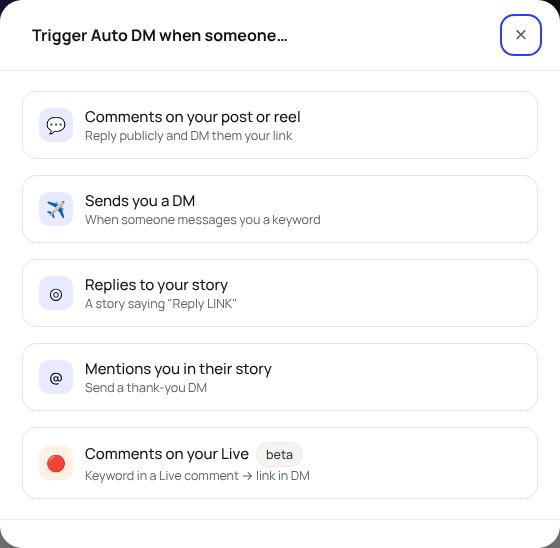
Auto DM → Create automation → Comments on your post or reel. Phir chuno:
- Specific reel: sabse common.
- Any post: ek keyword saare posts par.
- Next post: reel daalne se pehle hi ready, taaki pehle comments ko bhi turant DM mile.
Step 3: Keyword aur public reply
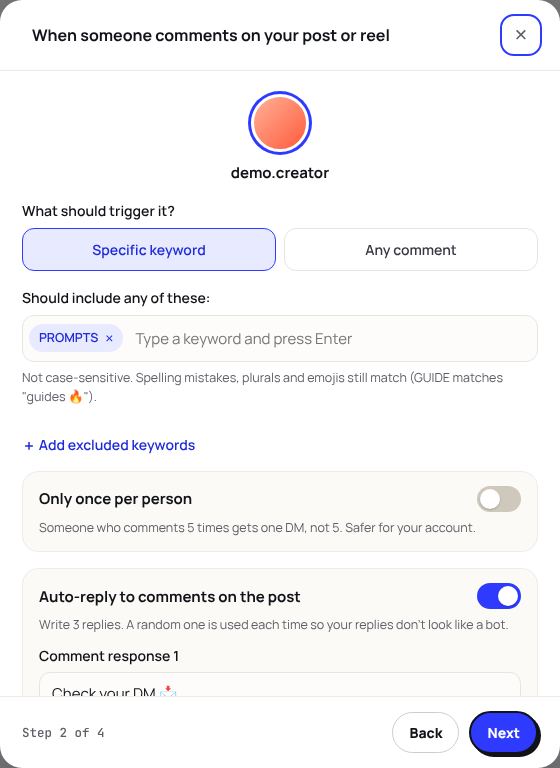
Ek chhota keyword likho, jaise GUIDE, aur Enter dabao. Capital, small, plural, choti spelling galti aur emoji sab match ho jaate hain, toh "guides 🔥" bhi chalega. Phir 3 public replies likho, har baar ek random jaayega:
- @{username} DM check karo 📩
- Bhej diya! Inbox dekho 📥
- Done ✅ DM mein hai
Once per person on rakho, taaki 5 baar comment karne wale ko ek hi DM jaaye.
Step 4: DM likho
Chhota rakho, batao kya mil raha hai, aur link button par lagao:
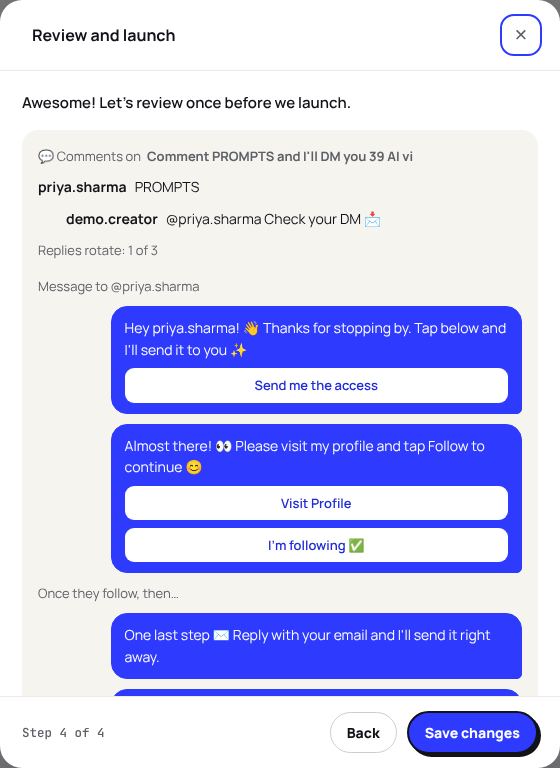
Hey {username}! 👋 Ye rahi tumhari free guide 🎁 Neeche button dabao.
[ Guide kholo ]
Chaho toh aur bhi jod sakte ho: follow to unlock, email ya WhatsApp number maangna, 3 tak buttons, aur kuch ghante baad follow-up offer. Ready messages: DM templates.
Step 5: Review karo aur on karo
Last step mein poori conversation dikhti hai, bilkul waise jaise fan ko milegi. Link check karo aur on kar do. Test karne ke liye kisi dost se doosre account se keyword comment karwao, kyunki apne hi comment par auto DM nahi jaata.
Purani reel par bhi chala sakte ho
Reel pehle se live hai? Automation banao, naye comments ko DM jaayega. Purane comments ke liye Send to past comments use karo, lekin Instagram sirf 7 din purane comments tak DM allow karta hai.
Results badhane ke tips
- Keyword reel ke pehle 3 second mein bolo, screen par dikhao, caption aur pinned comment mein bhi likho.
- Har reel ka alag keyword rakho, taaki reel report mein pata chale kaunsi reel chali.
- Best freebie par follow gate lagao, followers badhenge.
- 3–6 ghante baad follow-up bhejo, sale aksar wahin hoti hai.
Aur padho
- Instagram auto DM kya hai? Simple bhasha mein samjho: Instagram auto DM kya hota hai, kaise kaam karta hai, kya ye safe hai aur creators isse followers, leads aur sales kaise banate hain.
- Comment par automatic DM kaise bheje: Instagram guide: Instagram reel ya post par comment karne walon ko automatic DM kaise bhejein: keyword, any post, next post, buttons aur menu.
- Instagram par followers kaise badhaye: auto DM wala tarika: Reels ke views ko followers mein kaise badlein: comment keyword aur follow to unlock, real steps aur tips ke saath.
Aksar pooche jaane wale sawaal
Kitna time lagta hai?
Pehli baar 5–10 minute. Uske baad naya automation 2 minute mein ban jaata hai.
DM nahi gaya toh kya karein?
Check karo keyword sahi hai, comment 7 din se purana nahi hai, aur Activity page dekho. <a href="/guides/why-instagram-dm-not-sent">DM kyun nahi gaya</a> guide mein saare reasons hain.
Kya mobile se set kar sakte hain?
Haan, ReplyInbox phone ke browser mein chalta hai aur phone app ki tarah install bhi ho sakta hai.
Kya ye free hai?
Haan, free plan mein har mahine 1,000 DMs hain.