Kyun zaroori hai
Followers algorithm ke haath mein hain: aaj reel chali, kal nahi. Email aur WhatsApp list aapki apni hai. Launch ke din sabko ek saath bata sakte ho, webinar ka link bhej sakte ho, aur list wale log ek reel dekhne walon se kahin zyada khareedte hain.
Flow: comment → DM → email → freebie
- Ek aisa freebie banao jiske liye log email dein: checklist, template, mini-course, prompt pack.
- Reel: "Comment GUIDE karo, main bhej dunga."
- Comment karne wale ko DM: "Apna email bhejo, guide turant aa jayegi 📩"
- Email aate hi freebie ka link chala jaata hai.
- Email Leads mein save, reel ke keyword ke tag ke saath.
ReplyInbox mein set kaise karein
- Comment automation kholo, DMs step par jao.
- A DM asking for their email on karo, message apne style mein likho.
- Required chuno agar sirf email dene walon ko freebie dena hai, ya Skip button rehne do agar reach zyada zaroori hai.
- Chaho toh A DM asking for their WhatsApp number bhi on karo.
- Primary DM mein freebie ka link lagao aur launch karo.
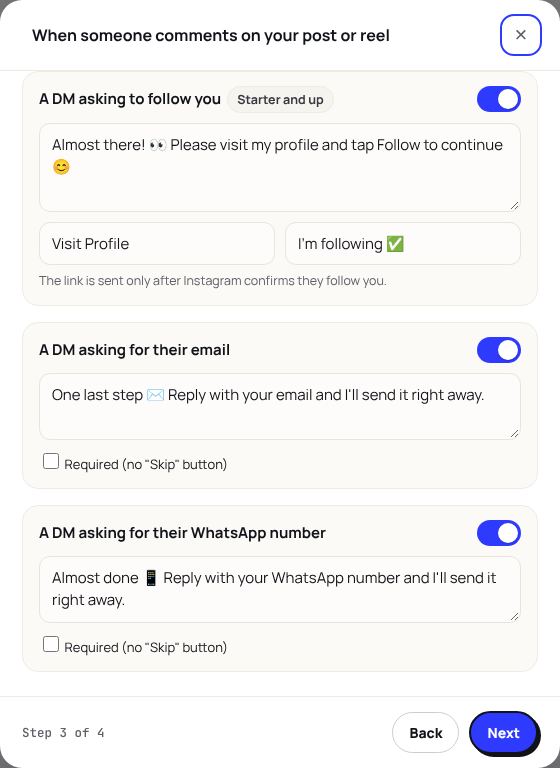
Agar koi galat email likhe (jaise "rahul@gmail"), ReplyInbox politely dobara poochta hai: "Hmm, ye email jaisa nahi lag raha 🤔". WhatsApp number ke saath bhi aisa hi hota hai.
Leads kahan jaati hain
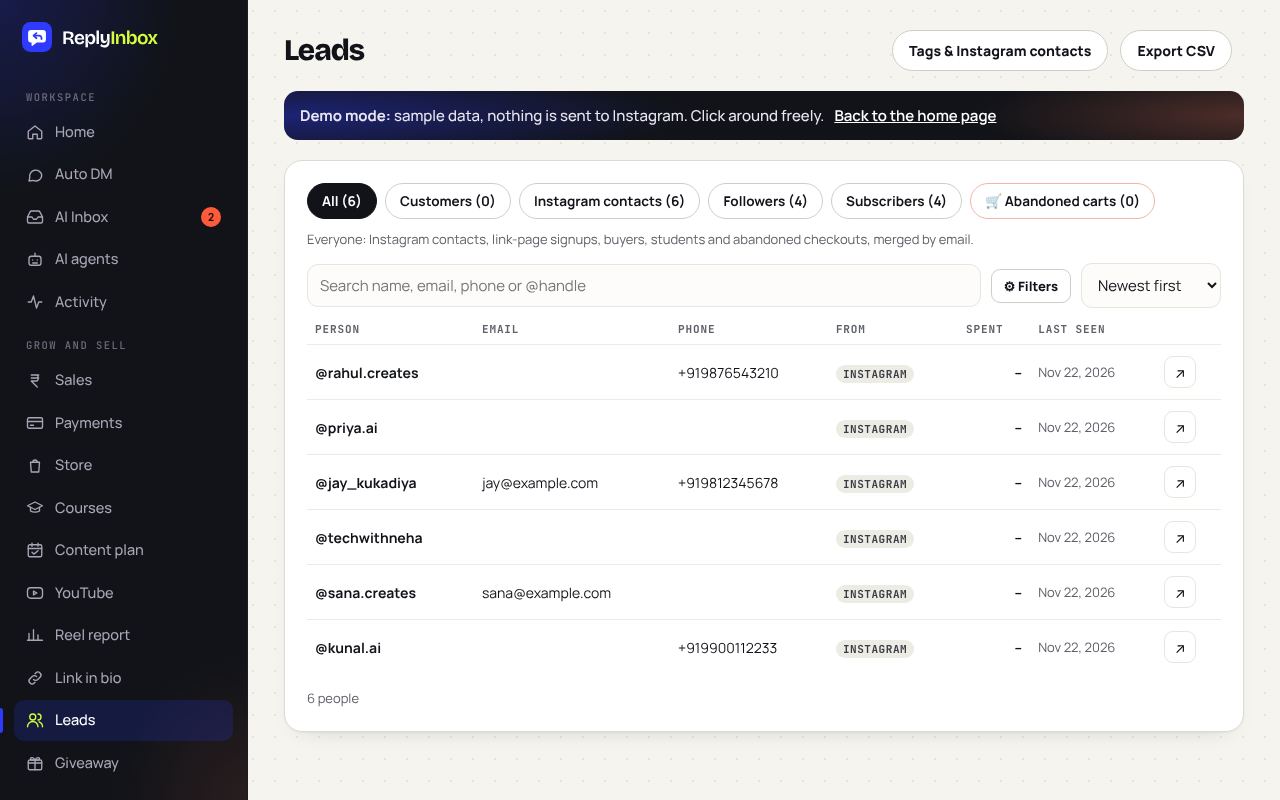
- Leads page: har insaan ka handle, email, phone, kahan se aaya aur kya khareeda.
- CSV export: Mailchimp, Brevo, ConvertKit ya kisi bhi email tool ke liye.
- Webhook: Google Sheets, Zapier, Make ya Pabbly mein turant (Settings → Integrations, har plan par).
Message aisa likho ki log haan bolein
- Wajah batao: "taaki next part bhi bhej sakun".
- Ek line, bas. Freebie hi reward hai.
- Har reel par email aur number dono mat maango. Jo use karoge, wahi maango.
- Follow to unlock ke saath jodo: ek comment se follower bhi, email bhi.
List ka use kaise karein
- Usi din ek welcome email bhejo, freebie dobara ke saath.
- Tag se segment karo: BUDGET wale ko finance launch, PLAN wale ko fitness.
- Launch pehle list ko: early-bird price sirf list ke liye.
- WhatsApp time-sensitive cheezon ke liye (webinar 7 baje), email baaki sab ke liye.
Sirf wahi bhejo jiska wada kiya tha, aur email tool mein unsubscribe link rakho.
Aur padho
- Instagram auto DM kya hai? Simple bhasha mein samjho: Instagram auto DM kya hota hai, kaise kaam karta hai, kya ye safe hai aur creators isse followers, leads aur sales kaise banate hain.
- Instagram auto DM kaise lagaye: 5 steps mein (2026): Instagram par auto DM kaise set karein: account connect karna, keyword, public reply, DM aur button, step by step screenshots ke saath.
- Comment par automatic DM kaise bheje: Instagram guide: Instagram reel ya post par comment karne walon ko automatic DM kaise bhejein: keyword, any post, next post, buttons aur menu.
Aksar pooche jaane wale sawaal
Email capture kis plan mein hai?
Starter (₹149 / mahina) aur usse upar.
Kya Google Sheets mein ja sakti hain leads?
Haan, webhook se (Settings → Integrations), 2 minute ki Google Apps Script recipe ke saath, ya Zapier/Make se.
Kya WhatsApp number bhi le sakte hain?
Haan, email se pehle ya baad mein, same tarike se.
Galat email aaye toh?
ReplyInbox format check karke dobara poochta hai. Skip allowed ho toh bina email ke bhi freebie mil jaata hai.